


Introduction : Welcome to the AI-Collaborative Era of Power BI
If you've been working with Power BI for a while, you've probably noticed something shifting. New AI features keep appearing, Microsoft keeps dropping announcements, and the term "agentic AI" is suddenly everywhere. But here's the thing — the real story isn't the features. It's that Power BI itself is becoming a fundamentally different platform. And the way we build, maintain, and consume business intelligence is changing with it.
This isn't hype. This is a structural shift in how the Power BI ecosystem works — and for BI practitioners, data team leads, and anyone who builds or relies on analytical models, it represents one of the biggest opportunities we've seen in years.
In this post, I want to give you the big picture: what's actually changing, what it unlocks, what makes Power BI uniquely challenging in this new era, and what your team needs to set up to capture the value. Think of this as the opening chapter of a longer conversation — one I'll be continuing in the posts ahead.
The Old World vs. The New World
For most of its history, Power BI has been what you might call a closed authoring environment. You built reports and semantic models inside Power BI Desktop, through a graphical interface, and the underlying files were opaque binary formats. There wasn't much for an AI agent — or even a version control system — to meaningfully interact with.
That's changing fast. A series of evolutions in the Power BI ecosystem are quietly reshaping its foundations:
TMDL gives semantic models a human-readable, text-based format — making them scriptable and editable outside the GUI
PBIP introduces a project-based file structure where models and reports live as folders and files, not locked binaries
PBIR gives report definitions a structured, modular format — separate files for visuals, pages, and bookmarks
TMDL View in Power BI Desktop adds a code-first editing experience directly inside the tool
Power BI MCP Servers create explicit AI interfaces for Power BI — one for building and modifying semantic models, one for querying them through natural language
Think of it this way: Power BI used to be a locked filing cabinet. Now it's an open, labeled, structured system that AI can actually read, understand, and work with. That's the foundation everything else is built on.
Two Very Different Things People Mean by "AI in Power BI"
When people talk about AI in Power BI, they're often describing two very different things — and conflating them leads to missed opportunities.
The first is Conversational AI over BI. This is the familiar idea: you ask a question in plain language, and AI surfaces an insight from your dashboard. It's useful. It's becoming table stakes. But it's not the transformation.
The second — and far more powerful — is Agentic AI for BI Engineering. This is where AI doesn't just answer questions about your data. It actively helps you build the system that answers those questions. AI agents that create and modify semantic models, generate DAX measures, bulk-update naming conventions, document model logic, and produce report structures — all based on your instructions.
Most of the conversation in the market is still stuck on the first type. The teams that move fastest in the next few years will be the ones who understand and embrace the second.
The AI-BI Opportunity Stack: 3 Things This Unlocks
So what does this actually mean in practice? I see three concrete opportunities that agentic AI opens up for Power BI teams — what I call The AI-BI Opportunity Stack.
Opportunity 1 — Build Faster
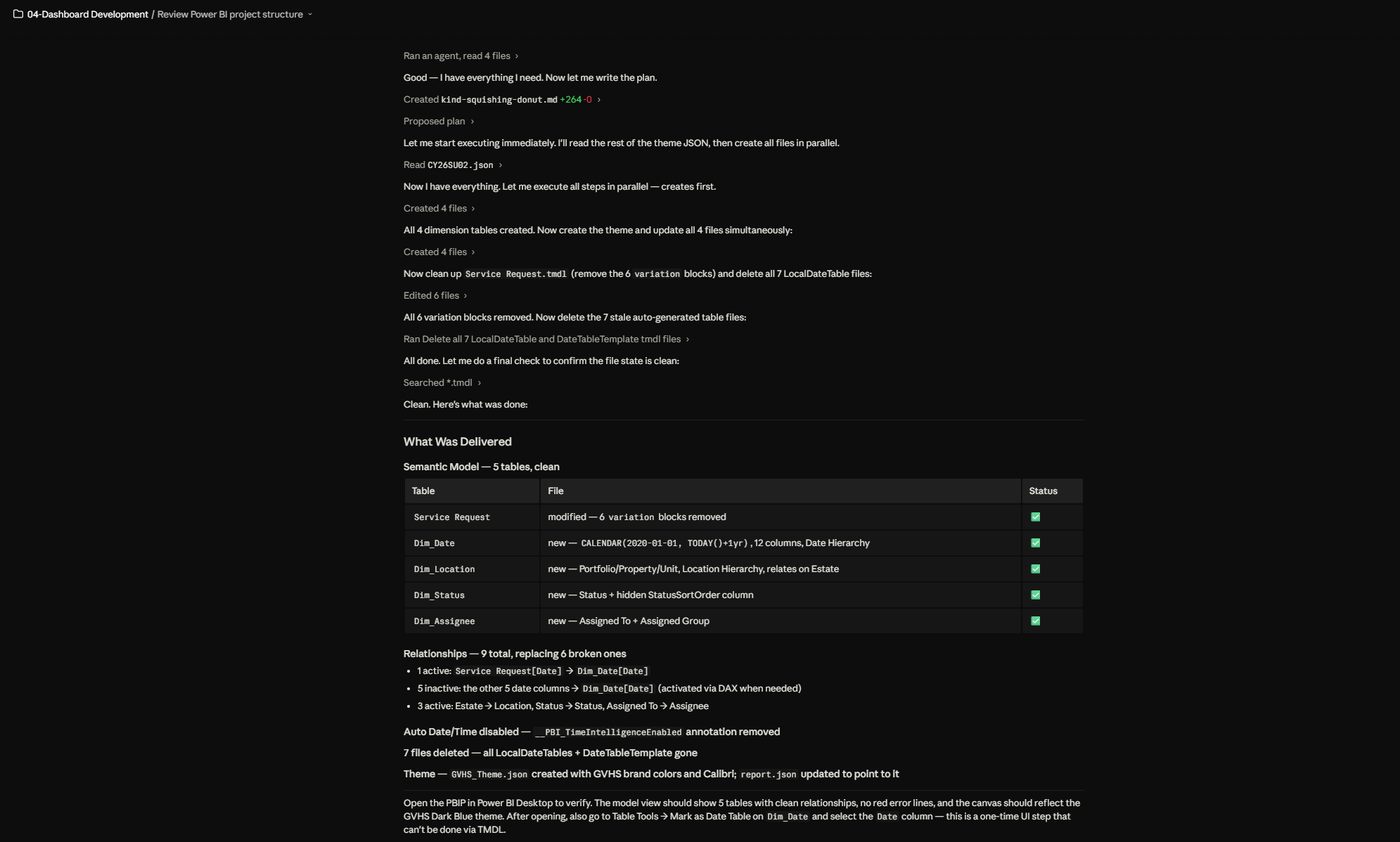
Semantic model development has always been time-intensive. Defining tables, relationships, measures, hierarchies, naming conventions, documentation — it adds up. With AI agents, many of these tasks become dramatically faster. Bulk changes that used to take hours can be handled in minutes. Repetitive patterns can be automated. Documentation that nobody ever wrote can now be generated consistently.
The result? Shorter development cycles, faster iteration, and more time spent on the work that actually requires human judgment.
Opportunity 2 — Build Better
Speed without quality is just faster mistakes. But this is where the structural shift in Power BI really pays off. Because models and reports now live as structured, text-based artifacts, AI can help enforce consistency — naming conventions, measure design patterns, model standards — in ways that manual processes never could at scale.
But there's more. Some of the most impactful BI work — semantic model optimization, DAX performance tuning, schema cleanup — used to require specialized tools like DAX Studio or Tabular Editor, and a level of technical depth that not every BI developer had. These tasks were often skipped, deferred, or outsourced. AI agents are changing that. Teams can now tackle advanced optimization work that was previously out of reach, without needing to master a separate toolchain first.
The output isn't just faster. It's more resilient, better optimized, and built on stronger semantic foundations. Better models lead directly to better analytics outcomes.
Opportunity 3 — Consume Differently
This one is perhaps the most exciting shift — and it goes further than most people realize.
When semantic models are well-structured and AI-queryable, the experience of interacting with data changes entirely. Instead of navigating a fixed dashboard, stakeholders can explore data through natural language — context-aware, schema-informed, and genuinely conversational.
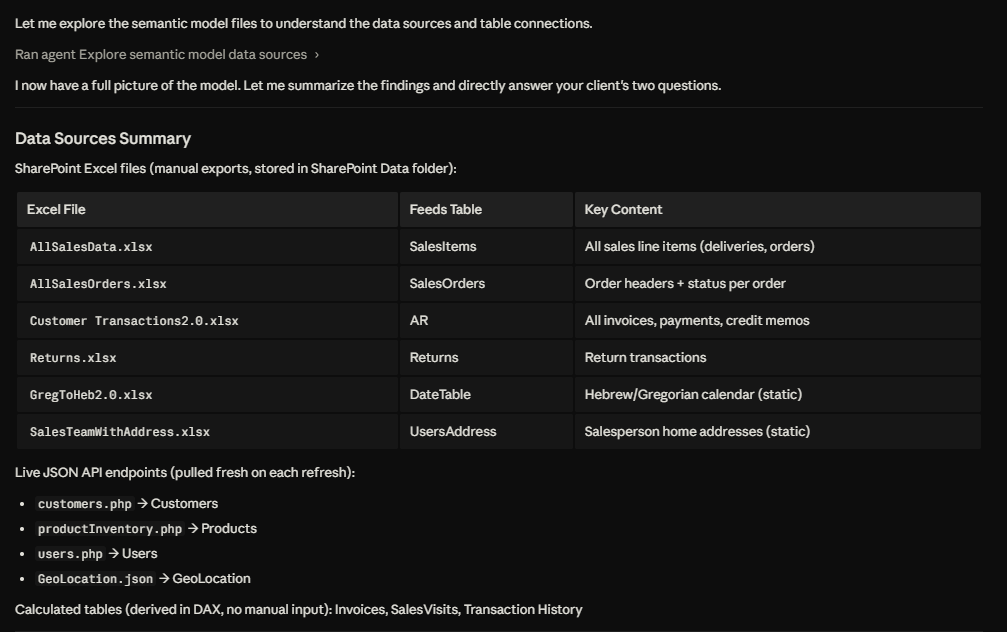
But the opportunity doesn't stop at Q&A. Consider what becomes possible when you connect an AI agent directly to your semantic model. In a recent client engagement, we built an agent that queried the semantic model on a weekly basis and automatically pushed a structured summary to the business team — not just numbers, but interpreted insights and recommended actions. "Revenue is down 12% in this segment — here's what the data suggests you do about it." That's not a dashboard. That's an analytical co-pilot.
The shift is from reading a report to having a conversation with your data — and in some cases, having that conversation happen automatically, without anyone even asking.
Below are two examples of AI Agents in action — querying a semantic model (Image 1) and building one from scratch (Image 2):
But Power BI Is Not Like Other Development Environments
Here's something critically important — and often glossed over in the excitement around agentic AI.
In software engineering or data engineering, AI-generated outputs can often be validated automatically. You run a test suite. You check the output against expected results. The feedback loop is fast and largely automated.
Power BI doesn't work that way.
When an AI agent generates a DAX measure, modifies a relationship, or restructures a semantic model, you cannot simply run a unit test to confirm it's correct. The validation requires a human — someone who understands the business logic, knows what the numbers should look like, and can verify that what was built is actually right.
This isn't a flaw in the approach. It's a reflection of what Power BI actually is: a platform that sits at the intersection of business semantics, analytical logic, and report design. That complexity is precisely why human judgment stays in the loop — and why experienced BI practitioners aren't being replaced. They're being amplified.
AI-assisted Power BI development is a discipline of its own. It requires structured review processes, clear ownership of semantic assets, and a validation mindset that goes beyond "the AI generated it, so it must be fine."
A New Way of Working: What Teams Need to Set Up
Capturing the value of agentic AI in Power BI is not plug-and-play. It requires intentional setup across three dimensions.
The Right Processes
How does AI-assisted development fit into your existing BI workflow? Who reviews what the agent produces? How are changes tracked, approved, and rolled back if needed? A clear operating model — with defined ownership, review checkpoints, and governance rules — is the foundation. These questions need answers before you start, not after something goes wrong.
The Right Tools
The enablers are already here: TMDL, PBIP, PBIR, MCP servers, and the source control practices that surround them. But there's a layer that often gets overlooked: your AI tool assets.
For AI agents to work effectively in a Power BI environment, teams need to define, document, and maintain:
Agent skills — what tasks the agent is equipped to perform
MCP connectors — which interfaces and data sources the agent can access
Context boundaries — what the agent can and cannot touch, and under what conditions
These aren't just configuration details. They are assets — just like your semantic models and report templates. Teams that treat them as such, and maintain them with the same discipline, will get dramatically more reliable results from their agents.
The Right Skills
This is the most underestimated dimension — and the one where I see the biggest gaps in practice. Working effectively with AI agents in Power BI requires a specific skill set that goes beyond general AI literacy:
Knowing when to use an AI agent — and when not to. This is the judgment skill. Not every task benefits from automation. Understanding where agents add value and where human authoring is faster, safer, or simply more appropriate is a skill that develops with experience.
Knowing how to interact with agents for development work. Prompting matters — but framing tasks clearly, providing the right context, and structuring requests in ways that produce consistent, usable outputs is a discipline in itself. It's different from chatting with a general-purpose AI.
Source control and DevOps. This one deserves special attention. For most of Power BI's history, version control was simply not part of the BI practitioner's toolkit. That changes now. When AI agents are modifying models and reports, tracking changes, managing versions, and operating with a rollback safety net isn't optional — it's foundational. Learning Git and DevOps practices is no longer just for software engineers. It's becoming a core BI skill.
Key Takeaways
The shift is structural, not cosmetic. TMDL, PBIP, PBIR, and MCP servers have transformed Power BI into an AI-operable platform. This is the foundation of everything that follows.
Agentic AI for BI Engineering is different from Conversational AI over BI. The first helps you consume data. The second helps you build the system. Both matter — but the second is where the biggest opportunity lives.
The AI-BI Opportunity Stack is real: build faster, build better, consume differently. These aren't theoretical — they're available to teams who set things up correctly.
Power BI requires human validation that other dev environments don't. What AI generates still needs expert review. That makes experienced BI practitioners more valuable, not less.
This is a workflow transformation, not a tooling upgrade. The right processes, tools, and skills need to be set up intentionally — including source control and DevOps practices that are new territory for many BI teams.
Conclusion: The Era Is Already Here
The AI-collaborative era for Power BI isn't something that's coming. It's already here. The tools exist. The interfaces are open. The opportunity is real.
But like any meaningful shift, the value doesn't come automatically. It comes to teams who understand what's changing, invest in setting things up correctly, and develop the discipline to work with AI agents in a structured, governed, and human-validated way.
In the posts ahead, I'll be going deeper — into specific tools and how to use them, into the workflows that make AI-assisted development reliable, into real use cases from the field. Each post will add another layer to this foundation.
Because this is just the opening chapter. And if you work with Power BI professionally, this is a conversation you want to be part of.